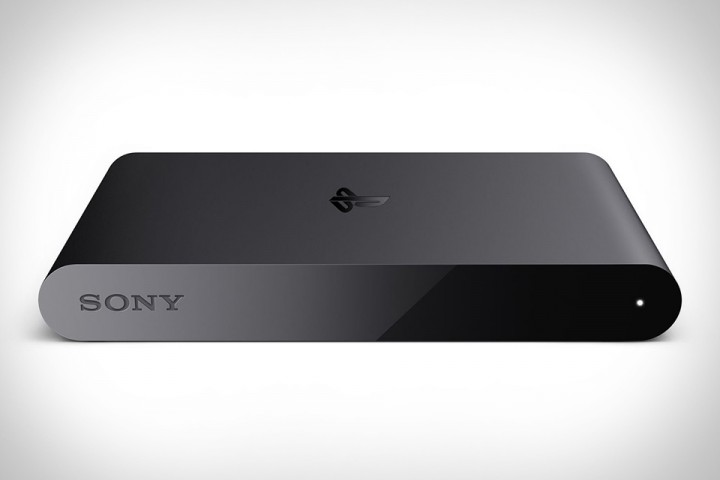
Almost a year after its Japanese debut, PlayStation TV (known as PlayStation Vita TV in the Asian territories) has arrived in North America, despite the non-existent marketing campaign surrounding it. This tiny new piece of hardware hopes to bring the same gaming enjoyment that the PlayStation Vita handheld brings over to the bring screen, but also some exciting features from Sony’s latest home console the PlayStation 4. Although it sounds great on paper and could potentially shape up the future of the PlayStation brand for future devices, PlayStation TV doesn’t offer anything relatively mind-blowing, making it a required device to get the most out of the PlayStation ecosystem. That being said however, PS TV has its use for everyone, but it all depends on your personal PlayStation gaming needs.
Let’s start with the hardware itself; PlayStation TV is a very simplistically designed system that is both slick and small in size, which is always something that is appreciated. It is roughly the same size as a PlayStation Vita and weights about 110 grams. Despite being a relatively small device, its technical specs remain the exact same as the handheld with a Quad-core ARM Cortex-A9 MPCore CPU, 512 Megabytes of RAM, 128 Megabytes of VRAM and a Quad-core Power VR SGX543MP4 Graphics Card. The only big difference is with its Display because PS TV is projected on your television screen and not an LCD/OLED Vita Screen. Thankfully, PS TV’s resolution supports 720p, 1080i and 420p, which is totally fine for Vita games that are blown up in size for a bigger screen. Also, it has 1 GigaByte of Internal Memory, so you can start playing some small-sized games, even if you do not possess a Memory Card for the system, as soon as you remove it from the box.

As you can see, the system is relatively small
On the back of PlayStation TV are your usual ports with the HDMI OUT, USB 2.0 (used to sync up your DualShock 3 or DualShock 4 controller), Memory Card, Ethernet, AC and a Power Button. One thing that is worth mentioning about the cables that come with the PS TV system is that the HDMI cable is extremely short in length, measuring less than 10 feet. This means that, if you have a complicated gaming setup like I have, be ready to spend an additional $20-$30 for a longer HDMI cable. It not that big of a deal, but it is something to consider if you do not want to spend an exorbitant amount of cash on the device. As for your physical Vita games, there is a port on the side of the console made specifically to put the game cartridges inside.
Sony did not take any risk while designing PlayStation TV’s user interface. It simply took the same LiveArea screen concept present with the Vita’s menus as a Home Screen dashboard. There are no surprises either with the apps that are already installed on the device as they are identical to the handheld. You’ll be able to surf the web, look at your Trophies, interact with your friends in parties, respond to emails and much more, just like you would usually do with your PlayStation Vita. Although I did not mind the lack of anything relatively new with the apps and UI since PS TV was designed as television-compatible Vita, some key functionalities of the handheld are simply not present in the system, mostly due to the lack of any touch-based control system, even if you are using a DualShock 4 as a controller. Sony did a good job of tweaking the menus to allow the same accessibility as the handheld, yet navigating through them is a slow process since you cannot just swipe and tap the app or option you want to use. This isn’t a big flaw, but it’s just mind-boggling to see that it isn’t supported at all, even when it could with the DualShock 4’s touchpad. Another thing that doesn’t make sense is the fact that the console cannot be powered up from the controller after it is synced up and fully functional with your PlayStation TV device. Once again, this is a not a feature that ruins the system as a whole, but little things like these hurt it from justifying its purchase.

The back of PlayStation TV
Not only is PS TV missing some essential features with its menus, but it is also lacking with its games library. Though it does have a staggering 700 launch games line-up composed of Killzone: Mercenary, Borderlands 2 and Minecraft PlayStation Vita Edition, not all Vita games are supported by PlayStation TV, mostly due to its lack of touch screen and gyro sensor. AAA Games like Uncharted: Golden Abyss, the Metal Gear Solid HD Collection and PlayStation All-Stars Battle Royale do not work on the system and it is still unknown if PS TV will eventually support these games in the future. On the other end of the spectrum, most PSP and PSOne Classics games are supported by the system, meaning you’ll be able to buy and play those old games to your heart’s content.
Because your PlayStation ID is always linked with the PlayStation ecosystem, you’ll be able to download digital titles you have already purchased for your Vita, and PlayStation 3 and PlayStation 4 titles that support cross-buy. Even though it is great to have the same games spread out over multiple consoles, I just don’t see the point in playing the same games on PlayStation TV. For instance, why would I want to play Spelunky on my bedroom TV screen with PS TV when I can just sit down in my home theater and play it on a projector screen on PS4? I’d rather enjoy the experience on a much bigger screen personally. After playing around with my PS TV-supported games for a couple of hours, I came to the realization that my main utility for PS TV was to play Vita-exclusive games on a bigger screen with a controller and not cross-buy titles I can play on another television screen. Although, because it is a small device, I can see its utility of using it somewhere else than your home by simply bringing the system with you, plugging it on a different television, and playing games from it. It’s very neat idea, but, then again, it simply does not apply to my personal life style.

Looks familiar, doesn’t it?
Probably the biggest selling point with PS TV is the ability to Remote Play PlayStation 4 games on the device. This means that, assuming your PlayStation TV is in another room than your PS4, you’ll be able to stream and play games from Sony’s next gen system via your PlayStation TV on a different television screen. This is a very interesting feature, but, ultimately, it all depends on your Internet connection’s strength. If you are planning on streaming PS4 games via Wi-Fi, expect a lot of screen tearing, lag and latency with many games. However, if you are using the same wired connection as your PS4 to connect PS TV to the Internet, the streaming quality is significantly better and almost lag-free. Additionally, PS TV is currently in open beta for PlayStation Now, meaning you have access to the same stream-supported games library that is also available on the service for PS3 and PS4. Once again, it all depends on how good your connection is. Additionally, if you were hoping for to use any streaming media apps such as Netflix, Crackle and Hulu Plus on PS TV, you’ll have to Remote Play them from your PS4 because they are not supported by the system currently.
PlayStation TV has many flaws, but, in the end, your purchase must be entirely justified by what you plan on doing with the device. If you don’t have a PS Vita and don’t want to pay $200 for the handheld, PS TV is a good alternative with its $99 console and $139 bundle, which includes a DualShock 3 controller, a USB 2.0 cable, an 8GB memory card, The Lego Movie: Video Game, and all the other stuff that is included with the regular system. Just keep in mind that you won’t be able to play the entire PS Vita games library on your PS TV as of right now. If you have a PS4 and want to stream games to your PS TV on another television, the system has its use for that as well, but make sure your Internet connection can keep up with the constant streaming. If you have a PS4 and a PS Vita, it’s a little hard for me to recommend buying PS TV because you can basically do the exact same things on the Vita, except the screen will be smaller. Ultimately, like I have mentioned previously, getting PS TV all depends on your needs as a gamer. It’s a device that has its use to some extent, but falls short in delivering a must-have product for your PlayStation ecosystem. There are just too many things to consider and the additional hassle to make it work to its full potential is simply not worth it.
If you still have any concerns regarding PlayStation TV after reading this article, please visit Sony’s Ultimate PS TV FAQ for additional information that has not been touch upon here, and stay tuned to Gamer Headlines for all things gaming.
[show_avatar email=maximechiasson@videotron.ca align=center user_link=authorpage show_name=true show_biography=true max_bio_length=200]