
Chinese tablets used to absolute rubbish a few years ago. But their game plan has changed some what recently with the addition of Windows backed tablets and the newer Bay Trail quad core CPU’s from Intel. Improved hardware with the combination of WIndows 8.1 has created a score of new tablets that have features that better or rival the likes from major brands such as Dell. Lenovo or Acer.
One such tablet which I’ve been reviewing is the Onda v975w. Onda? Well it’s a well known brand within China. Outside of China they are pretty much unknown, I had never heard of them. So what is so special about this tablet? Well it sells for around $200 usd or under and packs some interesting hardware.
- A high-res retina display – Yes, it’s the same IPS LG display used in the Apple Air. A 2048 x 1536 (264PPI) resolution display with great colors, brightness and sharpness. Much better than the normal 1378 x 768 IPS panels you would find in the likes of the Asus T100ta.
- Intel (Bay Trail) z3740D quad core CPU with a 1.83 Mhz turbo. Intel 7th Gen HD graphics is the GPU
- 2GB of ram, standard on almost all the Atom based tablets.
- Full Windows 8.1 32bit. Not that horrible WIndows RT. This is a full version which means you can run all x86 applications you would on a normal PC.
- 32GB of internal storage. Its an eMMC flash drive. Not as fast as a SSD, but it is silent.
- Full array of ports, mini HDMI out. Mini usb, 3.5mm headphone jack and a MicroSD card slot.
- Microsoft Office 365 and licence was included with the tablet.
The main attraction here I feel is the high-resolution display and the fact it’s a full Windows 8.1 tablet all for under 200 dollars. Okay so it looks like an Ipad Air clone, that might not be a bad thing. Air accessories should fit the Onda v975w as the size is very similar. A 4:3 screen ratio and the 9.7 inch size make it good for viewing websites. Lets have a look at the key features in detail:
Design:
Available only in white the Onda v975w looks like an ipad without the home button in the middle of the bottom bezel. It’s 241mm in height by 169mm wide and 8.5mm thin. Not bad at all. Plenty of ports and is charged via the micro usb port. This port can be used as a full size usb with the included micro usb to usb 2.0 adaptor. It’s just usb 2.0, but it lets you connect say a wireless usb keyboard and mouse. This paired with the micro hdmi allows you to use the tablet in a desktop setup when connected to a monitor.
The rear of the tablet is aluminium and the whole feel of the tablet is pretty good, I’m taken with the build quality. I did not expect it to be as good as this.
Screen and Touch response:
The Onda v975 as mentioned uses a Retina display, the exact some one Apple use in their IPads. Viewing angles are good and the brightness is very decent. It’s blinding when using it in the evening and I found I have to lower the screen brightness somewhat. There is a noticeable gap between the glass and the IPS screen of around 1mm, but it doesn’t take away too much from the look of the display. The touch sensitivity and response is excellent, it’s like using a Surface or Ipad here. Not like other Chinese tablets I have tested where you had to push a little harder to have the touches register correctly. Not here, its responsive and I did not have any issues selecting things on the screen. The DPI scaling increase of 200% in Windows matchings the screen resolution quite well. And next to my Surface 3 Pro the screen is just as sharp to look at, but you do notice that the screen is not sitting flush against the glass like the Surface 3 pro’s panel. But then again you’re talking about a machine that is 6 times more expensive than this tablet.
Camera’s and Sound:
Speaker output is very poor. Maximum volume is not good at all, you would be hard put to hear sound coming out of the two rear speakers in a noisy environment. Inside in a quite environment its fine. The 3.5mm jack doesn’t support headsets with microphones built in. So when using one I found out it didn’t work if fully inserted, I had to pull it out a bit in order to work. Normal standard stereo headphones without the mic worked fine and it was loud enough.
Using skype on the front web camera it gave a decent enough image. It’s a 2MP camera up front and a 5 mp autofocus unit on the rear. The front camera needs good lighting to work well, poor lighting it was really pixelated didn’t look very good. The rear camera takes passable photos for a 5mp snapper.In fact in some shots it looked better than the 5mp camera of my Surface 3 Pro (The Surface has no auto focus). Still it was quite usable for Skype. But I would leave the photos for your camera or mobile phone.
Performance:
For an Atom powered tablet, the z3740D with 2GB of ram does a fine job of running multiple tabs in Chrome. Windows IE11, runs very smooth and quick in app mode and I had no issues streaming 1080p clips from youtube.
I could even run a 4k video that I recorded from my LG G3 flawlessly on the Onda. That really surprised me. Basic office and web browsing tasks are not an issue for this tablet. But you have to remember you have only 2GB of ram to manage, so multitasking too much will make the tablet choppy. Don’t expect to encode 1080p video on this machine and surf the web with multiple tabs at the same time. The latest bay trial Atoms are so much better than the previous generation, but they still have their limits. The bay trial is more focused on low power consumption rather than raw power.

The internal 32GB eMMC drive had around 20GB free when I first started using the tablet, but this will fill up quickly. Luckily there is a microsd card slot and my 64GB sandisk ultra microsd ran without any issues on the device. Clocking around 24mb/s transfer speeds. And the eMMC drive reached around 160mb/s read and 50 write which is respectable for an eMMC flash drive. These drives are still the bottleneck of any atom powered tablet. My benchmark is below:

I was able to run Dreamweaver and Paintshop CS3 without any issues. So if you needed to do a little photo editing on the go its possible. But I wouldn’t want to do any serious editing as it was a tad slow. However, it could be used if your in a pinch and your pc or laptop isn’t with you.
Note: For some reason the bios has 512mb dedicated memory allocated to the GPU, this causes issues in the store blocking you from downloading various titles that require 2GB of ram. As Windows will only have 1.5GB available. To fix this, go into the bios and set the intel GFX DMT allocated memory to 64Mb or 128mb. There is no performance hit for doing this as the intel graphics will still automatically allocate more ram if required.
Gaming:
The few Windows store games I tested ran fine. But you need to lower the resolution to 1024 x 768 for some titles to run smoothly. GT Racing 2 is very choppy on the native resolution and is almost unplayable. Quitting the game, changing the resolution and then restarting on the lowest resolution made GT Racing 2 smooth and very playable. Non 3D demanding games from the store run just fine on the default screen resolution. Keep this in mind as 2048 x 1536 is a demanding resolution for gaming on any tablet or laptop.
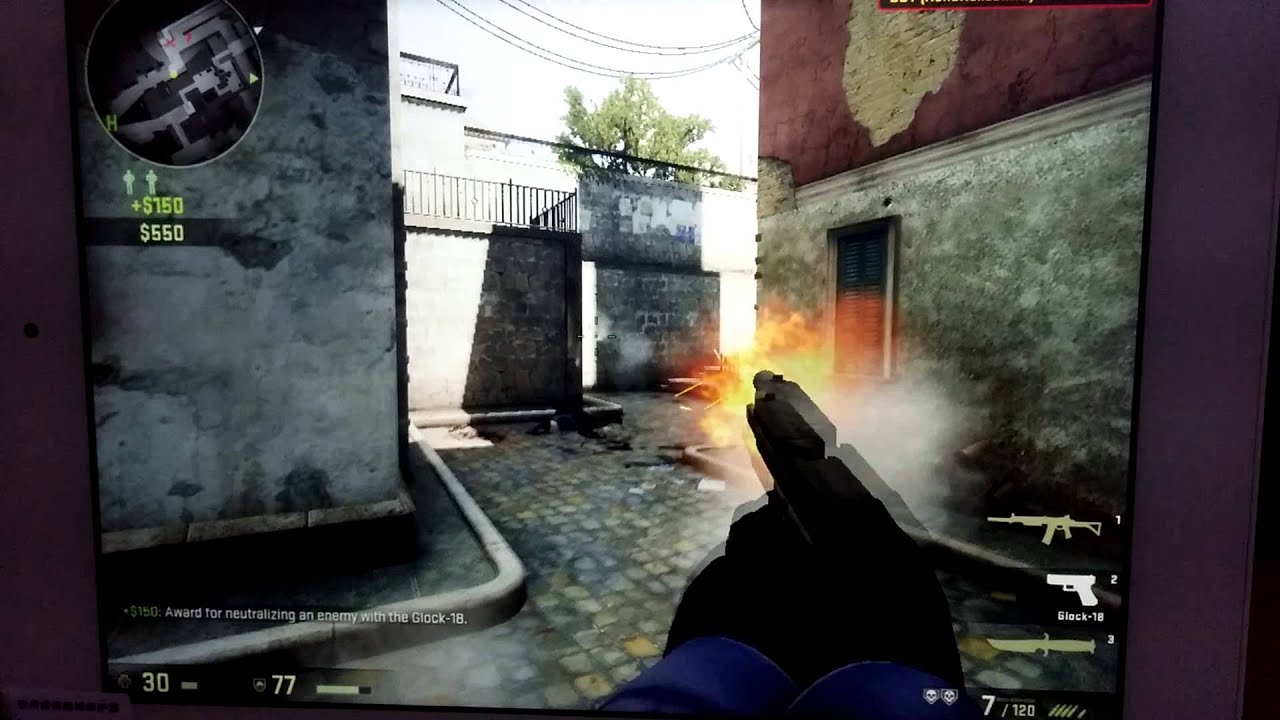
I even went as far as testing Steam and Counter Strike GO on the tablet. It’s just playable on the lowest setting and resolution. Still a pretty amazing feat considering this is a 9.7″ tablet.
Battery Life and Charge time:
Onda state around 8 hours of normal use and 6 hours of 720p video playback. During my testing with the tablet I managed about 5 hours with around 60% screen brightness. I’m sure if I was to lower the brightness somewhat I could squeeze out another hour. Charging the tablet with the supplied 2.5A usb charger took around 4 hours from 5% to 100%. Charging it with my LG G3 charger which is rated at 1.8A took much longer, almost 6 hours. So it would pay to use the supplied charger unless you have a Note 4 which has the same charger output of 2.5A
Keep in mind too that if you want to use the usb port you can’t charge at the same time unless you use a USB hub and charging cable all-in-one such as this.
Rating and Conclusion:
8/10
For 200 bucks or under this tablet has amazing value. Great performance thanks to its Intel quad core CPU and HD graphics, paired with great high-resolution retina display you can’t go wrong.
I only wish the sound output was a bit louder. And maybe an hour or more of battery life would be nice. This is the only downside of the tablet.
Hands on video:
