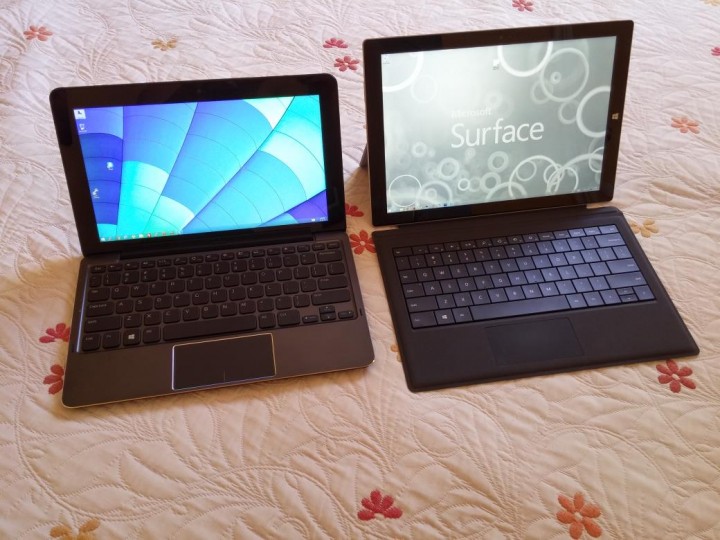
If your in the market for a new tablet with pen capabilities The Surface Pro 3 and the Dell Venue 11 Pro are two Windows 8.1 tablets that should not be overlooked. Both are aimed more towards business users, with their digital pens, removable keyboards and long battery life. But which is the best tablet for a business orientated user? It depends on a users needs of course.
These two machines are quite difference when you look at them. For starters the Surface Pro 3 is has a 12″ screen with a 3:2 screen ratio, so the tablet itself is much higher than the Venue 11 Pro, which uses a more common 10.8″ 16:9 ratio (widescreen) The CPU in both models are also different, one is a low voltage unit 15w (i5 4300U) and the other an a 11.5w (i5 4300Y) ultra low voltage CPU. So in terms of power the differ too.
We will get more into that below. Let us not forget that the Venue 11 Pro is an older machine too. We have had both of these two tablets in the Gamer Headlines office and you would think comparing these two would be a clear cut case right? Easy to see the winner? No, Not really. Both have very different strengths and weaknesses which we will outline below. And its not as easy as you would think.
Design and upgradeability: The Surface Pro 3, looks much nicer than the Venue 11 Pro. there is no denying it. With it unibody looks, thin size and practical kick stand it stands out from the Venue 11 Pro. But there is a catch, there is no replaceable battery. Unlike our Venue 11 Pro, it has a removable battery and on this model you can even upgrade the M.2 SSD drive to something larger if you wanted too. The Mircosoft is a sealed unit. So when that battery starts to fade after a few years of use it will need to be sent in to be repaired. (Not an issue for some that upgrade every year!)


The Dell has a cheaper fell to it due to the use of plastics and weights about the same as the Surface Pro 2. And the Dell is thinker with larger scree bezels. In terms of speakers, the Surface Pro 3’s speakers are front facing. And the Dell’s stereo speakers are on the left and right. Both speaker sound tinny as you can imagine. But our Venue 11 Pro’s do sound slightly better and louder.
Both have one USB 3.0 port and offer MicroSD card support, but the Surface Pro 3’s mircoSD slot is much faster, its connected up to a USB3 bus, whereas the Venue 11 Pro’s port is limited to USB 2.0 speeds. The Surfaces slot is easy to remove and insert cards. But on the Dell you need a pin to open and release the MicroSD slot. And they don’t include a tool for it.
Display out from the Surface is a mini Displayport, whereas the Dell has a mini HDMI port. Both work well. But the Displayport solution is better and you can daisy chain monitors with DP. The Surface Pro 3 includes a digital pen, and the Dell doesn’t. In our testing the Dell’s pen was less accurate than the Surface Pro 3’s. The new Dell V2 pen is much better over the old one, but at times it was a little inaccurate when writing in One Note and can be a pain to use.
Winner: We have to Say that the Dell even with its replaceable components, just can’t compete with the premium feel and design of the Surface Pro 3. That kickstand is very useful. And the Dell you need to use the Keyboard dock to hold the screen up.
Screen: The Dell Venue has a bright 10.8 inch IPS display that is a 1920 x 1080p display with a standard widescreen resolution. The Dell’s screen in our testing proved to be a bit brighter than the Surface Pro 3’s. Its also the perfect resolution for watching 1080p movies as they display correctly, sharply and don’t have borders. If you play movies on the Surface Pro 3 screen, you’ll have borders and they are rather larger top and bottom due to that 3:2 ratio. The viewing angles also saw the Venue 11 Pro’s IPS win points. They were slightly better than the Surfaces.

The Venue 11 Pro screen was just a bit brighter than our Surface Pro 3
The Surface Pro 3 on the other hand has a much higher resolution IPS display 2160 x 1440 pixels. Windows uses a default 200% scaling which seems to work. But some programs the fonts don’t scale correctly and you get blurry fonts. You do however get a lot more working space and more viewing area when looking at documents and websites. You can see why Microsoft opted for this ratio. Using the Surface Pro 3 in portrait mode too, the 3:2 ratio being wider is much more usable.

SP3: Its great for use in portrait mode.
Winner: Draw: The Surface Pro 3 screen is more practical, but the Dell screen is slightly brighter and perfect for widescreen media use, which we see a lot of nowadays. Microsoft are hoping the taller screen will pay of for them. We think it will, it does make note viewing and web browsing more enjoyable. It comes down to this, will you watch more video on the tablet or use it more for documents and websites?
Hardware and Battery life: The Dell Venue 11 Pro anywhere from a Atom Bay trail quad core CPU, an i3 4o2oY, i5 4210Y and a i5 4300Y CPU which our units shipped with. Its got 4GB of ram, but you can configure up to 8GB of ram much like the Surface 3 Pro. Our SP3 comes with an i5 4300U and 8GB of ram. There are options for an i3 model, and i7 4650U models that are more powerful. For every day use both systems are fast enough. However the Surface has the advantage with its low voltage CPU, it can turbo more, is faster and better. The Dell Venue’s i5 4300Y is an ultra low power CPU. So is a bit slower, turbo less.
SSD options. The Dell Venue 11 Pro ships with 64GB on the Bay trail Atom model, 128GB on the i3 models and 128GB up to 512GB on the i5 models. Depending on the configuration. Our unit has a Sandisk X110 128GB M.2 SSD which is quite quick, 500mbs read rates and 340 write rates.The Surface Pro 3, has 64GB up to 512GB Samsung SSD’s. They are also fast, around unit gives us about 530mb/s read rates and 300 write.
Battery life: On the Venue we can get around 6-7 hours battery life, however with the Battery keyboard dock, we can make that around 10-11 hours which is impressive. Our Surface Pro 3, manages around 7-8 hours. Due to the extra battery in the Dell Venues keyboard dock (Optional we might add) you can keep working for longer.
Winner: The Surface Pro 3, its much faster and can multitask a bit faster than the Venue 11 Pro. And still has a good battery life from the tablet itself. Without having to use a heavier keyboard battery dock like the Dell.
Cameras: The Surface Pro 3’s cameras are what Microsoft call Lifecams. Are they are truly horrible for anything but live video calls. Microsoft opted this time for cheaper parts. Scrapping the Autofocus function of the Surface Pro 3’s camera. That’s right, the Surface Pro 3 camera has no autofocus. Bad move on Microsoft’s part.

Surface Pro 3 cameras are not good at all for photos! From top to bottom. Ipad, Rear SP3 camera and front SP3 camera. Photo Credit: coolmik89
Its blurry and horrible. Cost cutting? There are those of use that say, well I have a mobile for photos. But if your a Student or a Business user, a useable camera is a godsend on a tablet. As you can take pictures of text, diagrams, plans, barcodes whatever! Its not like your going to walk about a tourist spot with your Surface or Venue 11 Pro out to take photos (Not like those iPad people that take photos with their iPads on trips!) But it’s a disappointment. Oh and forget about recording videos! Dell on the other hand, have a 8mp rear camera that HAS auto focus and can take usable photos. The front facing video camera isn’t impressive. But it does the job.

Both cameras on the two Tablets are disappointing. But the Surface Pro 3’s is the worst!
Camera Winner: The Venue 11 Pro, it handles photos and video much better than the Surface Pro 3. But still leaves much desired in terms of quality.
Keyboard: Neither of these tablets ship with the keyboard included, which is a bit of a let down. Our Surface Pro 3 has a backlit Type Cover 3, it’s very thin, but as a trade-off for its thinness has poor key travel and its more cramped up than our Dell. Typing on the Type Cover 3 Surface is fine, but it takes a bit to get use too.


The Dell on the other hand, we have the Mobile Keyboard Dock, its a chiclet style keyboard that is thicker than the Type Cover 3, it weighs more. But the experience is much better overall. By a mile! It’s simular to the Dell XPS 13 style keyboard. It has dedicated buttons with more features and shortcuts. Its spaced out keys give a better feel just like a laptop would. The battery in the Keyboard is great, adding a nice 30-40% more battery life to our tablet. Sure it makes it heavier and thicker, but we think its worth it. There is a downside, this Dell Venue 11 Pro mobile keyboard has no backlit keys. So if you like backlit keys, sadly this Dell doesn’t have them.
Keyboard Winner: The Venue 11 Pro keyboard is almost like typing on an Ultrabook. The bonus of a battery in the keyboard dock is a must for road warriors.
Tablet Issues: Neither tablet has been trouble free, we still have Wifi Issues with our Surface Pro 3, and sometimes we get high CPU load on the unit. Which can kill the battery life. The Dell, did have touch screen issues and “ghost touch” touches. Which is now fixed via a firmware update. The Pen has been troublesome, we had to get a replacement from Dell. But it seems the Venue 11 pro since its older, is now more stable. The SP 3 still needs a few more updates to reach 100% stability we feel.
Final Verdict: Our pick would be the Surface Pro 3, due to its high res screen, stellar design, weight and thinness. However, we must add, if your on the road a lot, need a longer battery life, need a decent tablet camera and a better keyboard. Go for the Venue 11 Pro, its also much cheaper than the Surface Pro 3. And from a Business point of view the Dell, is the way to go, with its replaceable battery. Sales reps or techs on the go can use it longer if they carry a spare battery in their bag. And its a thin and small battery, so it would not be hard to do so. And for the artist and designer that needs a decent digital pen, and more power.The Surface Pro 3 is your Windows 8.1 Tablet. The Dell’s pen is ok, but if your going to use it all the time it might leave you a bit frustrated. Go for the Surface Pro 3 and it includes its digital pen.
The biggest let down of all on these units has to be the Surface Pro 3 camera. Which 80% of people might not even care about. We expected for a Tablet of this price range to at least have a camera business users could use for taking snaps. And have useable images. Not the case, its disappointing to see from Microsoft how they have gone cheap on the camera. Which Windows Tablet would you pick? Please let us know in the comments.